Lcms2

Little CMS 2.19 released

Little CMS 2.19 released

I am glad to the announce the release 2.19 of the Little CMS open-source color engine. This is a featured release.

Changes:

- CMake build system. Thanks to Vlad Erium for the initial implementation and kmilos for improvements. 
- Large files support to use profiles up to 4Gb
- Black point compensation works on multi-channel profiles
- Added more test platforms/architectures in GitHub tests, Cygwin and MSYS are now fully checked.
- jpgicc banner is not shown on normal operation, only when help is requested.
- Added a way to access internal transform pipelines. For read only.
- Add a way to retrieve the CMM signature
- Added extra checks on postscript undocumented functions
- Added guard on integer overflow when reading .cube files
- Added unneeded checks as a try to get rid of spam reports about "vulnerabilities" that are not real.
- Utility program names generated by Visual Studio 2026 are now same as all other platforms.
- Creating an output profile by cmsTransform2DeviceLink does not propagate correctly the colorant table. Fixed.
- Added some profile class definitions from iccMAX
- Deprecated uint16 and uint32 types removed from tiffdiff
- fixed generation of tiffdiff on Cmake and meson

Little CMS intends to be an open source small-footprint color management engine, with special focus on accuracy and performance. It uses the International Color Consortium standard (ICC), which is the modern standard when regarding to color management. The ICC specification is widely used and is referred to in many International and other de-facto standards. It was approved as an International Standard, ISO 15076-1, in 2005.


Continue reading

Interger overflow

Integer overflow

(Download the PDF)

Introduction

This short article discusses an issue discovered during the AI Cyber Challenge (AIXCC), a remarkable competition where the Little CMS codebase was among the open-source repositories examined. Derek Zimmer from OSTIF reached out to me regarding a potential problem they had identified, and David Korczynski provided all the necessary details.

At first glance, the issue appeared to be a signed integer overflow; nothing more than the usual unpleasantness, with no serious implications beyond producing incorrect colors. It did not seem exploitable. However, when I attempted to fix it, I uncovered a rather intriguing and unfortunate coincidence that makes this bug worthy of a detailed write-up. I hope you find it interesting.

Continue reading

Color Management on Qt with LittleCMS

I’ve been using Qt, by Qt Group for years and I must confess I am delighted. Many toolkits promises the mantra “Code once and run everywhere”, but indeed this works with Qt. Qt6 was announced few days ago. They now include some sort of color management on images QColorSpace, but still no neat way to use complex ICC V4 pipelines.


Qt


In this small article I will show you how to do true RGB color management in Qt, by using LittleCMS, with very few lines of code.

Continue reading

Babl throughput comparative

From time to time, I discover wonderful things like this:

GIMP 2.10 release notes

“GIMP now uses LittleCMS v2, which allows it to use ICC v4 color profiles. It also partially relies on the babl library for handling color transforms, since babl is simply up to 10 times faster than LCMS2 for the cases we tested both of them on. Eventually babl could replace LittleCMS in GIMP.”

OMG! something seems very wrong with the Little CMS engine!! How it can be so slow despite all optimizations it internally has? Should I plan a major rewrite for those parts?

Continue reading

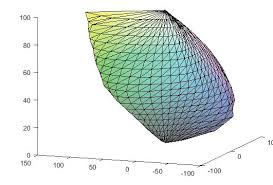
Visualizing gamuts

Days ago, a very interesting question arose in the mailing list.

How can I visualiza the gamut of a profile?

Little CMS does not offer direct tools to do that. But with some code, it is easy to do so. Be warned there is some hacking required.

A typical profile can be thought as a “black box” that translates values from a colorimetric space, usually CIE L*a*b*, to a device space. For example, RGB in a screen profile. Since the range of realizable colors (the gamut) is limited on real devices, not all Lab values would have a corresponding RGB. Only the Lab values that are inside monitor gamut would be displayed.

Continue reading